Signed Mutation Record (i-MR) Karnataka: Digitally Signed MR Copy (ಸಹಿ ಇರುವ ಮ್ಯುಟೇಶನ್ ದಾಖಲೆಗಳು)
Digitally Signed Mutation Register Extract (i-MR)
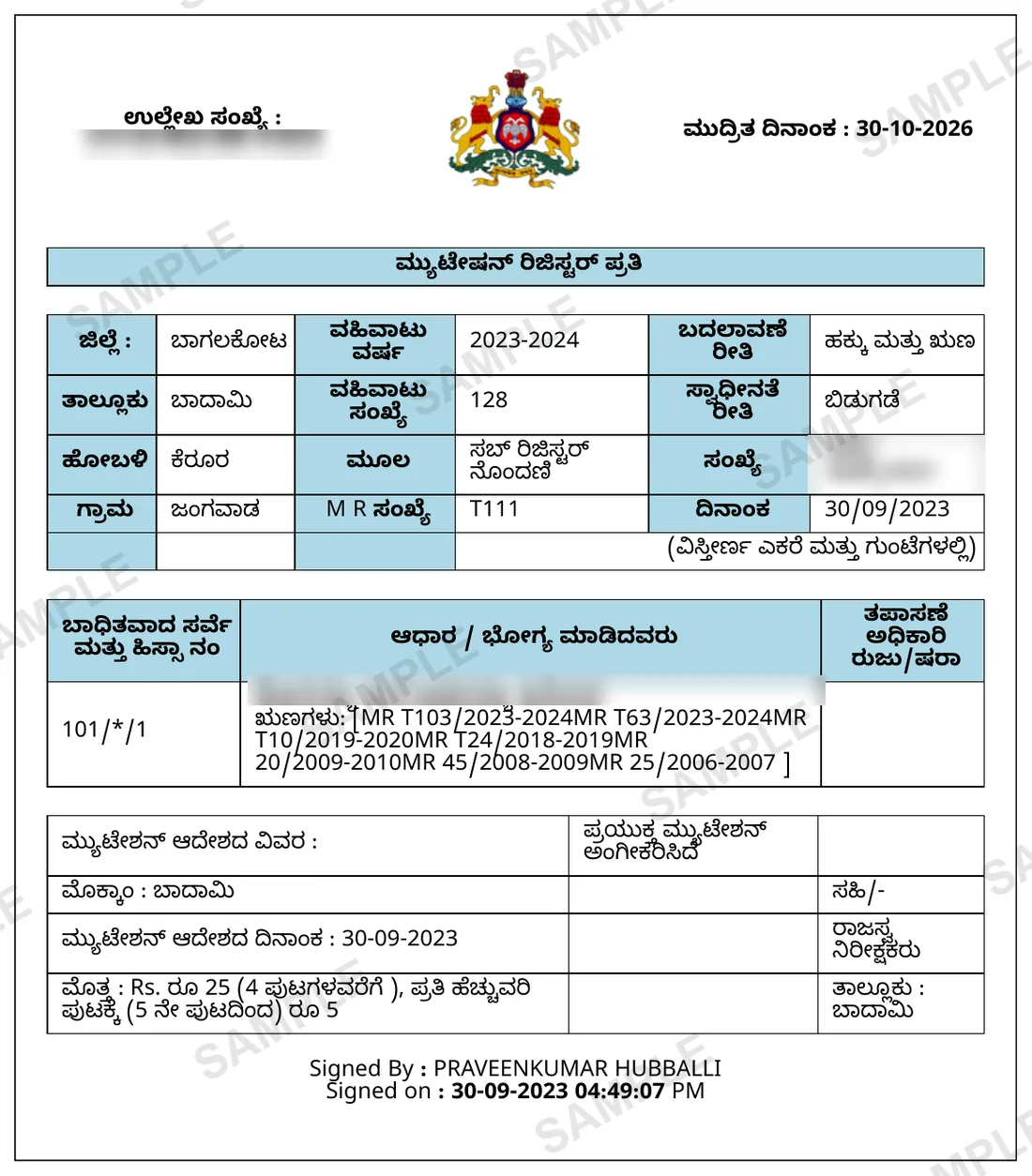
Digitally signed copies of the mutation entries on a survey number, from Bhoomi's i-MR service. One copy is one mutation entry, carrying its Bhoomi signature and a reference number anyone can check on Verify i-MR.
Your Signed MR, in about List in minutes, each copy in a few minutes.
Retrieved from Bhoomi i-MR (Service78) the moment you order.
In Kannada: ಸಹಿ ಇರುವ ಮ್ಯುಟೇಶನ್ ದಾಖಲೆಗಳು·Also known as: i-MR · iMR · signed MR · signed mutation · digitally signed mutation register · certified mutation copy · Verify i-MR · ಸಹಿ ಮ್ಯುಟೇಶನ್
How we know this: we retrieve the Signed MR from Bhoomi i-MR (Service78) for clients every working day, so the steps, failure modes and workarounds below are what the portal actually does — not a summary of its documentation.
Shubham Tiwadi is a partner at Anashwar Property Solutions in Vijayapura. His team operates the retrieval systems that pull Karnataka land records directly from the Bhoomi, Kaveri Online and e-Aasthi portals, and handles title verification for buyers across Vijayapura district.
What is the Signed MR?
The i-MR is the mutation register entry issued by Bhoomi's Service78 as a signed copy. Each copy covers one mutation: the transaction year and number, the MR number, the type and mode of the change, the source document, the survey and hissas it touches and the parties named in it. The "Signed By / Signed on" line is the digital signature the revenue official applied when the mutation was approved in Bhoomi, and the printed reference number (ಉಲ್ಲೇಖ ಸಂಖ್ಯೆ) lets anyone pull up the same entry on Service78's Verify i-MR page. The portal issues it as a web page printed to PDF, and the government fee is ₹10 per copy, whatever the page count.
Why you need this
Banks, courts and lawyers increasingly refuse the free "View RTC and MR" printout, which carries no signature, when a loan file or a title opinion rests on how the land changed hands. The signed i-MR shows the same entry with a signature and a reference they can check themselves. With Anashwar a free check first says how many mutation records the survey has; you pay one search fee that includes two signed copies, pick the entries you need from the list, and pay for any further copy on the same order.
What the Signed MR contains
- Signed By / Signed on line: the official's digital signature on the mutation
- Reference number (ಉಲ್ಲೇಖ ಸಂಖ್ಯೆ) for Service78's Verify i-MR
- District, taluk, hobli and village of the parcel
- Transaction year, transaction number and MR number
- Type of change (ಬದಲಾವಣೆ ರೀತಿ), mode (ಸ್ವಾಧೀನತೆ ರೀತಿ) and source document
- Survey and hissa numbers the mutation touches, with the parties named
- Liabilities carried on the entry and the mutation order details
Step by step
How to get the Signed MR online
- 1
Open Bhoomi's i-MR service on Service78 and log in with your mobile number and the OTP it sends.
- 2
Top up the i-Wallet; each signed copy deducts the ₹10 government fee from it.
- 3
Select District, Taluk, Hobli and Village, enter the Survey Number, and open the mutation list for the survey.
- 4
Find the entry you need by transaction year, transaction number and MR number; one mutation can be listed under several hissas but is one document.
- 5
Buy and print the signed copy, then note its reference number: anyone can enter it on Verify i-MR to see the same entry.
The official portal is Bhoomi landrecords.karnataka.gov.in (Revenue Department, Government of Karnataka). We fetch from it on your behalf — you never need to register there.
Anashwar Docs runs this sequence for you against the government portal and returns the PDF in List in minutes, each copy in a few minutes. Fill the form above to get it now.
What goes wrong
Common Signed MR mistakes
One copy is one mutation entry. A title opinion usually needs several — the entry that put the seller on the RTC, and the ones before it.
A mutation shown under several hissas is the same document each time; buying it once per hissa pays for the same copy twice.
The list on the portal shows no type of change; you only see whether an entry is a sale, inheritance or podi once it is opened.
The copy carries no QR code. It is checked by its reference number on Verify i-MR, and the reference re-prints the copy, so do not post it publicly.
Fix errors fast
Signed MR troubleshooting guide
| Symptom on Bhoomi i-MR (Service78) | How to fix it |
|---|---|
| The bank wants a "certified" mutation copy | The signed i-MR is the copy Bhoomi issues with a digital signature and a checkable reference. Show them the reference number on Verify i-MR. |
| Two hissas list the same mutation | It is one mutation that touched both hissas. One signed copy covers it. |
| No mutation records found for the survey | Check the survey number on the free RTC first. Entries from before Bhoomi's digitisation are in the taluk's old registers — ask for them as old land records. |
| The reference number shows nothing on Verify i-MR | Type it exactly as printed (it starts with IMR). If it still shows nothing, the copy did not come from Bhoomi. |
| Picked no record after paying the search fee | The search fee covers the search and the list, so it is not refunded if you pick none. The two included copies are only used when you pick. |
Frequently asked questions
What is a signed mutation record (i-MR)?
It is one mutation register entry issued by Bhoomi's i-MR service on Service78. The "Signed By / Signed on" line is the entry's own digital signature, applied when the official approved the mutation in Bhoomi.
How do I check a signed MR is genuine?
Each copy prints a reference number (ಉಲ್ಲೇಖ ಸಂಖ್ಯೆ) starting with IMR. Enter it on Service78's Verify i-MR page to see the same entry from the government's records. The copy has no QR code.
How is it different from the free MR?
The free MR from "View RTC and MR" is a viewing copy with no signature. The i-MR is the same entry with a digital signature and a checkable reference, which is what banks and courts ask for.
Does a signed MR prove ownership?
No. It proves that one change was entered in the revenue records, not that the transfer behind it was valid or that no later change exists. Read it with the RTC, the EC and the deeds.
How does Anashwar charge for signed MR copies?
A free check first says how many mutation records the survey has. One search fee includes two signed copies; each copy after that is paid on the same order when you pick it. The search fee is not refunded if you pick none.
5,800+ documents delivered across Karnataka
What customers say
Related
Documents you may also need
Mutation Register (MR)
Traces every ownership change — sale, inheritance, partition, court order — from earliest records to today.
ReadBhoomi i-Wallet / i-RTC
Obtain a digitally signed RTC (i-RTC) through the Bhoomi i-Wallet. The signed PDF carries a digital signature applied at issue, a printed RTC unique number and a barcode — the copy banks and sub-registrars accept — at one flat price per copy.
ReadBhoomi RTC — Pahani / Utara
Primary land ownership record from the Bhoomi portal — confirms who owns the land, land type, area, and tenancy.
ReadAI Title History Report
Give us the survey number — we pull the records ourselves and return a 20–30 page ownership chain, encumbrance analysis and risk report.
ReadGuides
How to read and use Signed MR
Mutation Pending in Karnataka: Check MR Status and Clear It in 2026
A mutation that has sat on Bhoomi for months is not "in process". It has a defect, an objection or a missing document. Here is how to find which, and who can move it.
RTC Name or Extent Wrong in Karnataka: How to Get It Corrected in 2026
A wrong entry on the Pahani is fixed by one of three routes: a mutation, a correction order, or a survey. Picking the wrong one wastes months. Here is how to tell them apart.
Anashwar Docs
Get your Signed MR now.
Enter the details below. We fetch it from Bhoomi i-MR (Service78) and return the official PDF in List in minutes, each copy in a few minutes.