E-Khata in Karnataka (ಇ-ಖಾತಾ)
Digitally Signed Urban Property Register
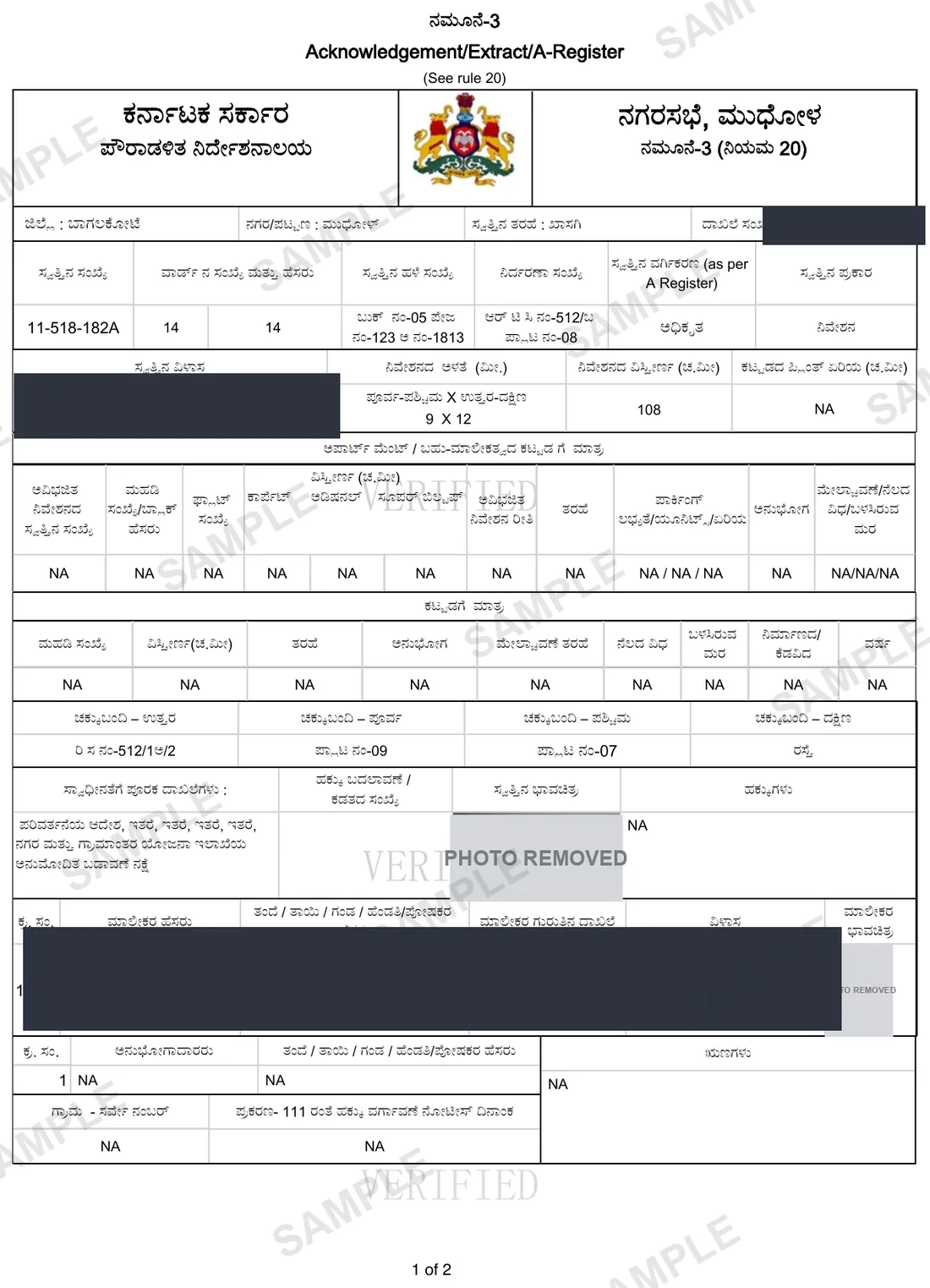
Digitally signed Khata — required for property registration, loans, and building plan approvals.
Your E-Khata, in about 46 minutes.
Median of 4 delivered orders, straight from E-Aasthi.
In Kannada: ಇ-ಖಾತಾ·Also known as: e-Khata Karnataka · A-Khata · B-Khata · khata certificate online · e-Khata Application · e-Khata Documents Required
How we know this: we retrieve the E-Khata from E-Aasthi for clients every working day, so the steps, failure modes and workarounds below are what the portal actually does — not a summary of its documentation.
Shubham Tiwadi is a partner at Anashwar Property Solutions in Vijayapura. His team operates the retrieval systems that pull Karnataka land records directly from the Bhoomi, Kaveri Online and e-Aasthi portals, and handles title verification for buyers across Vijayapura district.
What is the E-Khata?
The official digitally signed Khata certificate for urban properties, issued through the E-Aasthi system. It replaces the traditional handwritten Khata.
Why you need this
The E-Khata is mandatory for: property registration at the Sub-Registrar's office; building plan approval; utility connections; and home loan applications.
What the E-Khata contains
- Property owner name and assessment details
- Plot and built-up area measurements
- Property use classification (residential / commercial)
- Ward and ULB details
- Authorised officer's digital signature and QR code
Step by step
How to get the E-Khata online
- 1
Confirm the property has an E-Aasthi record and that the details on it are correct.
- 2
Apply for the E-Khata through the ULB's E-Aasthi service against the property identifier.
- 3
Pay the prescribed municipal fee.
- 4
The ULB verifies the record and issues the digitally signed certificate.
- 5
Download the signed PDF and verify the QR code resolves on the municipal portal.
The official portal is e-Aasthi eaasthi.karnataka.gov.in (Directorate of Municipal Administration). We fetch from it on your behalf — you never need to register there.
Anashwar Docs runs this sequence for you against the government portal and returns the PDF in 46 minutes. Request it on WhatsApp.
What goes wrong
Common E-Khata mistakes
A-Khata and B-Khata are not interchangeable. B-Khata property cannot be used for a home loan or a building plan approval, and converting it is a separate process.
E-Khata is only issued if the underlying E-Aasthi record is clean. Errors in owner name or extent must be corrected first, which takes far longer than the certificate itself.
Unauthorised construction beyond the sanctioned plan blocks issuance outright.
Pending property tax stops the application. Clear the demand before applying.
The certificate reflects the register at the moment of issue. If a mutation is in progress, wait for it to complete or the certificate will name the wrong owner.
Fix errors fast
E-Khata troubleshooting guide
| Symptom on E-Aasthi | How to fix it |
|---|---|
| Application rejected | Almost always the underlying E-Aasthi record, not the form. Check tax arrears, unauthorised construction, name mismatch and pending mutations. |
| Property is B-Khata | An A-Khata certificate is not available. The route runs through regularisation, and whether one exists depends on why it is B-Khata. |
| Certificate names the wrong owner | A mutation was in progress when it was issued. Wait for the transfer to complete and reapply. |
| QR code does not validate | Share the original signed PDF. Printing and rescanning breaks the signature. |
| Bank wants A-Khata and you have B | Mainstream lenders generally decline B-Khata. Confirm the position with the ULB for that specific property before assuming a scheme will fix it. |
Frequently asked questions
What is the difference between A-Khata and B-Khata?
A-Khata is the register for fully approved property; B-Khata is the BBMP's separate register for unapproved or irregular property and does not make it legal. The full comparison, including bank lending and regularisation, is in our A-Khata vs B-Khata guide.
What documents are required for e-Khata?
The registered sale deed, the latest property-tax-paid receipt, an Encumbrance Certificate for the property, the previous owner's khata (or the allotment letter for a new site), a sanctioned building plan where one exists, and the applicant's ID and address proof. The ULB may also ask for the NA conversion order for converted land.
How do I apply for e-Khata online?
Log in to the e-Aasthi portal for the Urban Local Body that assesses the property, search the property by PID or owner name, upload the documents above and pay the fee. The ULB verifies the record against the sale deed and tax ledger and issues the digitally signed e-Khata to the portal login. Anashwar Docs files and tracks the application for you.
Is E-Khata mandatory for property registration in Karnataka?
For urban property within a ULB, yes. The Sub-Registrar requires the E-Khata to register a transfer, and lenders require it for a home loan.
Why was my E-Khata application rejected?
The usual causes are outstanding property tax, unauthorised construction beyond the sanctioned plan, a mismatch between the E-Aasthi record and the sale deed, or a mutation already in progress on the property.
What is an e-Khata and who issues it?
The e-Khata is the digitally signed khata certificate for urban property in Karnataka, issued by the Urban Local Body from its e-Aasthi register — BBMP for Bengaluru, and the city corporation, CMC, TMC or town panchayat elsewhere. It confirms the property is entered in the municipal register in the owner's name.
How long does it take to get an e-Khata?
When the e-Aasthi record, tax payments and sale deed all agree, issuance is typically a few working days through the online portal. Discrepancies route the file to a manual verification queue at the ULB and can take several weeks.
760+ documents delivered across Karnataka
What customers say
"Excellent service. Found a plot on Solapur Road within a week. The consultant was very knowledgeable about the local market and helped negotiate a fair price. Highly recommend."
— Praveen Kulkarni
"Listed my house through Anashwar and got serious buyers within days. My contact number was never shared publicly — exactly what I wanted. Professional and trustworthy team."
— Shreya Patil
"Very transparent process. The consultant showed us properties matching our exact budget and requirements. No time-wasting. We bought a flat on Bangalore Road — very happy."
— Rajesh Desai
"I was nervous about listing my agricultural land but the team made it simple. Only 2% commission on sale, complete privacy, and sold within 3 weeks. Cannot ask for more."
— Anita Hiremath
Related
Documents you may also need
E-Aasthi
Urban property register from the municipality — owner, ward, tax status, and active mutation notices.
ReadBhoomi i-Wallet / i-RTC
Obtain a digitally signed RTC (i-RTC) through the Bhoomi i-Wallet. The signed PDF carries a digital signature applied at issue, a printed RTC unique number and a barcode — the copy banks and sub-registrars accept — and the portal charges a per-page fee.
ReadEC — Encumbrance Certificate
Shows every registered transaction on the property — loans, mortgages, and disputes since 2004.
ReadGuides
How to read and use E-Khata
B-Khata to A-Khata Conversion in Karnataka: Who Qualifies, What It Costs, How to Apply in 2026
A B-khata is a tax entry, not a title. Turning it into an A-khata means fixing whatever kept it out of the A register — usually conversion, layout approval or betterment charges — and then applying. Here is the whole path.
Khata Transfer in Karnataka: Process, Documents and Fees in 2026
A registered sale deed does not put your name on the khata. The transfer is a separate application at the local body — here is the process for BBMP, other ULBs and gram panchayats, with the documents and the usual delays.
Which Karnataka Portal Holds My Property Record? Bhoomi vs e-Swathu vs e-Aasthi vs Kaveri
Searching the wrong portal returns "no record found" for a perfectly real property. Which of Bhoomi, e-Swathu, e-Aasthi, BBMP e-Aasthi and Kaveri holds your record depends on one question — who taxes it.
e-Swathu Form 9 vs Form 11B: Guide to Gram Panchayat Property Forms in 2026
Understand the critical differences between Form 9 (A-Khata) and Form 11B (B-Khata) for Gram Panchayat properties in Karnataka under the e-Swathu system.
A-Khata vs B-Khata: what the difference actually costs a buyer
B-Khata property is cheaper for a reason. The discount is the market pricing in a financing problem, a construction problem and an exit problem that the seller is hoping you will not price.
E-Khata in Karnataka: from E-Aasthi record to signed certificate
The E-Khata is mandatory for registration, home loans and plan approval. Most rejections have nothing to do with the application — they are problems in the underlying E-Aasthi record.
NA conversion in Karnataka: what the DC order does and does not permit
A conversion order is granted for a specific extent and a specific purpose. Buyers routinely assume it covers the whole survey number and any use. It usually does neither.
Vijayapura plot prices by zone: what 113 live listings actually ask
Published rate tables for Vijayapura are guesswork. This one is computed from our own live listing book — 113 plots quoted per square foot across 11 zones, with the sample size shown for each.
Anashwar Docs
Get your E-Khata now.
E-Khata is keyed on its own document reference, not a survey number. Open the portal and enter it there — we fetch it from E-Aasthi and return the official PDF in 46 minutes.