Bhoomi i-Wallet / i-RTC: Get Digitally Signed RTC (ಡಿಜಿಟಲ್ ಸಹಿಯ ಪಹಣಿ)
Bhoomi i-Wallet Signed RTC
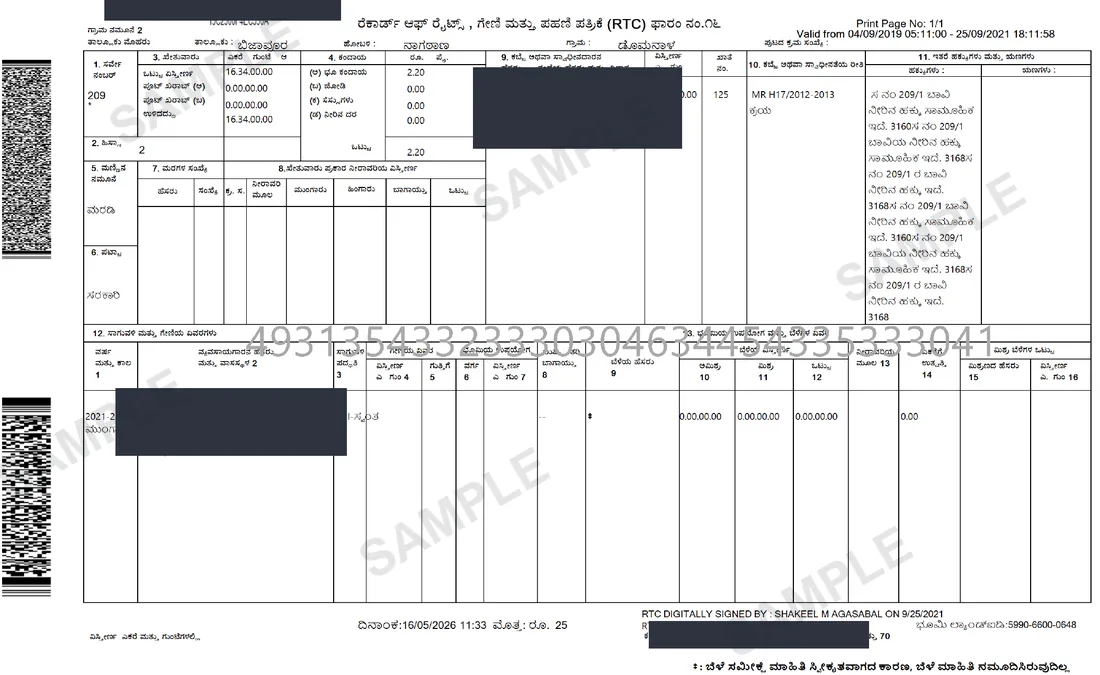
Obtain a digitally signed RTC (i-RTC) through the Bhoomi i-Wallet. The signed PDF carries a digital signature applied at issue, a printed RTC unique number and a barcode — the copy banks and sub-registrars accept — and the portal charges a per-page fee.
Your i-RTC / Wallet, in about 8 seconds.
Median of 4 delivered orders, straight from Bhoomi i-Wallet.
In Kannada: ಡಿಜಿಟಲ್ ಸಹಿಯ ಪಹಣಿ·Also known as: i-RTC · i-Wallet RTC · RTC wallet · signed Pahani · signed Utara · digitally signed RTC Karnataka · e-RTC · i-Wallet · iWallet · Bhoomi wallet · iRTC
How we know this: we retrieve the i-RTC / Wallet from Bhoomi i-Wallet for clients every working day, so the steps, failure modes and workarounds below are what the portal actually does — not a summary of its documentation.
Shubham Tiwadi is a partner at Anashwar Property Solutions in Vijayapura. His team operates the retrieval systems that pull Karnataka land records directly from the Bhoomi, Kaveri Online and e-Aasthi portals, and handles title verification for buyers across Vijayapura district.
What is the i-RTC / Wallet?
The Bhoomi i-Wallet (Service78) is the government payment gateway used to generate a digitally signed RTC (i-RTC). While the standard Bhoomi portal offers a free, watermarked preview, banks and sub-registrar offices require the clean digitally signed copy. To get it, citizens must log in with their registered phone number and an SMS OTP, add funds to their i-Wallet, and pay a per-page fee. The resulting PDF is digitally signed at issue and prints an RTC unique number and a barcode; the free Bhoomi copy carries neither, which is why it is refused where the i-RTC is accepted.
Why you need this
Banks processing home loans and Sub-Registrar offices processing property registrations often require a digitally signed RTC. The free view copy is rejected.
What the i-RTC / Wallet contains
- All fields identical to a regular RTC
- Digital signature of the issuing Revenue authority
- RTC unique number and barcode, checkable against the issuing portal
- Issue timestamp and authority stamp
Step by step
How to get the i-RTC / Wallet online
- 1
Open the digitally signed RTC service (i-RTC) at rtc.karnataka.gov.in and log in as a citizen.
- 2
Top up the i-Wallet — the signed copy carries a small statutory fee per page.
- 3
Select District, Taluk, Hobli, Village, Survey Number, Surnoc and Hissa.
- 4
Submit the request and pay from the wallet balance.
- 5
Download the signed PDF. Check the printed RTC unique number and barcode against the issuing portal; the PDF's own digital signature is what a bank's verification relies on.
The official portal is Bhoomi i-Wallet (i-RTC) rtc.karnataka.gov.in (Revenue Department, Government of Karnataka). We fetch from it on your behalf — you never need to register there.
Anashwar Docs runs this sequence for you against the government portal and returns the PDF in 8 seconds. Fill the form above to get it now.
What goes wrong
Common i-RTC / Wallet mistakes
The signed RTC and the free view RTC come from different portals. Requesting one does not give you the other.
Wallet top-ups can take time to reflect. Fund the wallet before you need the document, not during a registration appointment.
The signature is time-stamped. Banks routinely reject copies older than a few weeks — pull it close to your submission date.
If the digital signature fails to validate, the PDF has been re-saved or edited. Always share the original download, never a printed-and-rescanned copy.
Fix errors fast
i-RTC / Wallet troubleshooting guide
| Symptom on Bhoomi i-Wallet | How to fix it |
|---|---|
| Wallet balance not reflecting | Top-ups can lag. Fund the i-Wallet before you need the document, not during a registration appointment. |
| Digital signature fails to validate | The PDF was re-saved, printed and rescanned, or edited. Always share the original download. |
| Bank says the copy is too old | Lenders commonly want one issued within about 30 days. Pull it close to your submission date. |
| Requested the signed copy but got the free view | They are different services on different portals. The signed RTC comes from the i-RTC service, not the main Bhoomi view. |
| Parcel identifiers rejected | Same cascade rules as the plain RTC — District, Taluk, Hobli, Village, Survey No, Surnoc, Hissa, all chosen from the dropdowns. |
Frequently asked questions
How do I recharge the Bhoomi i-Wallet and download a signed RTC?
The i-Wallet is a prepaid balance on the Bhoomi Service78 portal. Register with a mobile number, add balance online, then request the digitally signed RTC for your survey number — the portal deducts ₹10 per page from the balance as it generates the document. The result is a PKI-signed PDF with a QR code, which is the version banks, courts and Sub-Registrar offices accept. The free RTC from the public "View RTC and MR" screen carries no signature and is rejected for those purposes.
What is the Bhoomi i-Wallet?
The Bhoomi i-Wallet is the prepaid government payment gateway (Service78) used to pay for digitally signed property records.
How do I log in to the Bhoomi i-Wallet?
You can log in to the portal using your registered mobile number and an SMS OTP.
Why does the i-RTC need the wallet?
The digitally signed i-RTC is a paid service, so the portal requires a funded i-Wallet to deduct the fee before it generates the document.
What does the signed RTC cost per page?
The portal deducts ₹10 per page from your i-Wallet balance when it generates the i-RTC.
What does "digitally signed" mean for a bank?
It means the PDF carries a digital signature applied at issue, plus a printed RTC unique number and a barcode that can be checked against the issuing portal. The plain Bhoomi copy is stamped for viewing only and carries none of these, which is why lenders refuse it.
740+ documents delivered across Karnataka
What customers say
"Excellent service. Found a plot on Solapur Road within a week. The consultant was very knowledgeable about the local market and helped negotiate a fair price. Highly recommend."
— Praveen Kulkarni
"Listed my house through Anashwar and got serious buyers within days. My contact number was never shared publicly — exactly what I wanted. Professional and trustworthy team."
— Shreya Patil
"Very transparent process. The consultant showed us properties matching our exact budget and requirements. No time-wasting. We bought a flat on Bangalore Road — very happy."
— Rajesh Desai
"I was nervous about listing my agricultural land but the team made it simple. Only 2% commission on sale, complete privacy, and sold within 3 weeks. Cannot ask for more."
— Anita Hiremath
Related
Documents you may also need
Bhoomi RTC — Pahani / Utara
Primary land ownership record from the Bhoomi portal — confirms who owns the land, land type, area, and tenancy.
ReadE-Khata
Digitally signed Khata — required for property registration, loans, and building plan approvals.
ReadMutation Register (MR)
Traces every ownership change — sale, inheritance, partition, court order — from earliest records to today.
ReadGuides
How to read and use i-RTC / Wallet
Documents Banks Ask For on a Land or Plot Loan in Karnataka: The Complete List and Where Each Comes From
Bank legal departments reject land-loan files for missing documents far more often than for bad title. This is the list they work from, which portal issues each item, and the version they will accept.
How to Read a Karnataka RTC (Pahani): Every Column Explained with What to Check Before You Buy
Survey number, extent and the owner's name are the three things everyone reads on a Pahani. The other thirteen columns are where the problems are. A column-by-column reading, with the red flags.
Mutation in Karnataka: How to Apply, Track the Status and Get the MR Extract in 2026
A registered deed does not change the RTC. Mutation is the Revenue Department's process that does — here is how to start it, why it stalls at the Village Accountant, and how to pull the MR extract once it is through.
Bhoomi Online Login & Services: i-Wallet, RTC, MR & Conversion Status in 2026
Learn how to navigate Bhoomi online login, top up your i-Wallet, and access services like RTC, MR extracts, and land conversion tracking in Karnataka.
Signed RTC vs Free RTC: Exploring i-Wallet Payments and QR Verification in 2026
A comprehensive guide to downloading legally valid signed RTCs using the i-Wallet system on the Bhoomi portal, compared to free informational RTCs.
Anashwar Docs
Get your i-RTC / Wallet now.
Enter the details below. We fetch it from Bhoomi i-Wallet and return the official PDF in 8 seconds.